
How to find the right spare parts
No matter how well you’ve looked after it, it’s inevitable that commercial kitchen machines or refrigeration will eventually need replacement parts. Thankfully, there’s a huge variety of over 4,000 spares and accessories available right here. With such a large selection, it’s not always easy finding exactly the right part, so this step-by-step guide should help you locate the part quickly.
SHOP SPARES & ACCESSORIES NOWIdentify the Machine
Although many parts are inter-compatible, it’s best to use the correct branded spare parts specifically designed for your machine. The first thing to do is identify the machine. By finding the right make and model, you’re much more likely to locate the correct, compatible parts.
- Brand: Most of the time, the brand of the machine should be obvious, as appliances usually feature a permanent brand badge or embossed logo on the front or top of the unit.
- Model Number: Manufacturers can produce many different versions of appliances, with relatively minor changes between each one. The model number helps to identify the exact machine.
Model numbers can usually be found on the Identification Plate. This is a small metallic plate or sticker which provides much more detailed information about the product. It’s usually either on the side, back or base of the unit. In fridges and freezers, the plate may be inside the refrigeration compartment. When a machine is especially old, this plate may have worn away or come off altogether. The identification plate usually looks similar to this example.

If there isn’t an identification plate, you may be able to find the model number in the User Manual. - Serial Number: Often just abbreviated to “SN” or “Serial”, this is usually a long number which lets the manufacturer identify when and where the machine was made. The serial number is usually on the identification plate, although sometimes it can be found in the user manual, on the packaging or even stamped onto the machine itself.
- Online Order History: If you bought the machine from Nisbets, you may be able to find the model and serial number through your order history on the Nisbets website. Log in and click “View Order History”. It helps to have a rough idea of when (month and year) the item was purchased.
TIP: Online Order History also allows you to check whether the appliance is still under warranty.
- Manufacturer: Finally, if none of this information is available, try to find the machine online. Perhaps check with the original retailer who sold the machine, or view the manufacturer’s website to narrow down which model it is. Don’t worry if it’s discontinued – many spare parts are still available years after a product becomes obsolete.
Once you have the brand and model number, you should be able to find the machine using the Nisbets website. Simply enter the model number into the search box and a full list of spares and accessories should be displayed, as well as the product itself.
You can also search for the appliance manually by going directly to the Spares and Accessories category. As long as you know the brand of the product, you can use the site navigation to narrow down your search criteria.
Identify the part
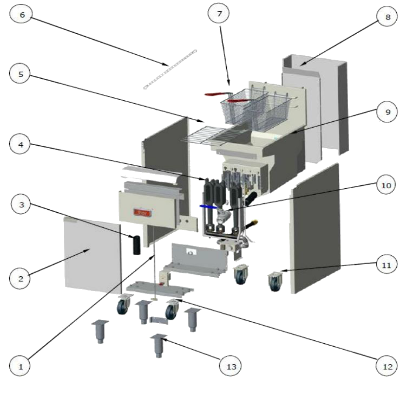
Once you’ve identified the machine and have it displayed on the website, the next stage is to identify the part. Whilst many parts are self-explanatory, such as fryer baskets or replacement doors, there are other parts which might be a bit more complicated to describe. For example, a contact grill has both upper and lower elements, so it’s important to identify the right replacement part for the job.
To locate the part, click on the Useful Documents tab – it’s to the right of the “Product Information” tab on the product page. (On mobile or tablet, the Useful Documents tab is further down).
This will then give you the option to download the Specification Sheet, the User Manual or the Exploded Diagram. Click on the Exploded Diagram to identify parts.
You’ll then see a full breakdown of the machine, as well as a chart below with codes and part descriptions.
Simply cross-reference the part you need and enter the code into the website. If there is a telephone icon under “code” please call for assistance, as the part may require specialist installation or may have an extended delivery time. Where multiple parts are covered under a single code, all those individual components are sold as a single “assembly” and not available singly.
TIP: Appliances are regularly updated. Remember to cross reference the Serial Number too. Product pages usually have compatibility information which includes suitable serial numbers.
Frequently Asked Questions
I still can't find the part. Can you help?
Yes! There's many ways to get in touch.
- Use the handy Live Web Chat function (the blue tab on the right hand side of any web page - available on most browsers)
- Call the expert Spares Team on 0845 111 0538 (option 1).
- Email the expert Spares Team at spares@uropa-service.co.uk
- Visit one of our many retail stores who are happy to help. To find the store closest to you, see our online Store Locator.
I need the parts urgently. How fast is delivery?
If the spare part is in stock, standard delivery for mainland UK is Next Day when ordered before 8pm. Premium delivery options are also available. Check out the Delivery Page for more details.
I'm not sure if I'm ordering the right part.
No problems. Assuming the component is unused, we will collect any items you wish to return FREE and with a full refund. For more information, see our Returns Page for more details.
Can Nisbets do repairs?
If the product is within warranty, call our Service team on 0845 111 0538 to log your warranty request.
If the product is out of warranty, we are able to repair a wide variety of machines, all at highly competitive prices. See our Repairs Page for further details.